
go之官方依赖管理工具dep安装和使用
大家都知道go没有一个自己的包管理平台。社区里go的第三方包托管在各个git托管平台。需要用到包时通过go get 命令工具安装,但这个工具没有版本描述性文件,在go的世界里没有“package.json”这种文件。这个给我们带来直接的影响就是依赖放在外网,而且没有版本约束,这个月下的版本,可能下个月更新了。有道是“工欲善其事,必先利其器”,这个时候我们就需要一个依赖管理工具。
目前依赖工具有很多,如:glide、godep等。今天主要讲是官方出品的dep,注意它和godep不是一个东西。
github地址不同
godep :https://github.com/tools/godep
dep:https://github.com/golang/dep
按照Peter Bourgon博文来说,它们的作者都有相同的人,但是一个是dep是官方版本,godep是第三方工具。
选择dep有什么好处呢?
1、官方出的,不用担心更新维护问题。
2、相对来说,比其他第三方工具兼容问题要好。
还有等用过以后再补。
环境要求
Golang >= 1.9
安装
On other platforms you can use the install.sh script:
$ curl https://raw.githubusercontent.com/golang/dep/master/install.sh | sh
安装完成,查看DEP版本
$ dep version
输出
dep:
 version     : v0.5.0
 build date  : 2018-07-26
 git hash    : 224a564
 go version  : go1.10.3
 go compiler : gc
 platform    : linux/amd64
 features    : ImportDuringSolve=false
初始化
mkdir $GOPATH/src/test
cd  $GOPATH/src/test
dep init
test目录生成如下文件
├── Gopkg.lock
├── Gopkg.toml
└── vendor
其中
- Gopkg.lock 是生成的文件,不要手工修改 Gopkg.lock 官方文档。
- Gopkg.toml 是依赖管理的核心文件,可以生成也可以手动修改,
一般情况下Gopkg.toml里面只定义直接依赖项,而Gopkg.lock里面除了包含Gopkg.toml中的所有项之外,还包含传递依赖项。比如我们的项目依赖项目A, 而项目A又依赖B、C,那么只有A会包含在Gopkg.toml中,而A、B、C都会定义在Gopkg.lock中。所以Gopkg.lock定义了所有依赖的项目的详细信息(commit ID和packages),使得每次build我们自己的项目时,始终基于确定不变的依赖项。Gopkg.toml 官方文档。 - vendor目录是 golang1.5 以后依赖管理目录,这个目录的依赖代码是优先加载的,类似 node 的 node_module 目录。
三个之间的关系
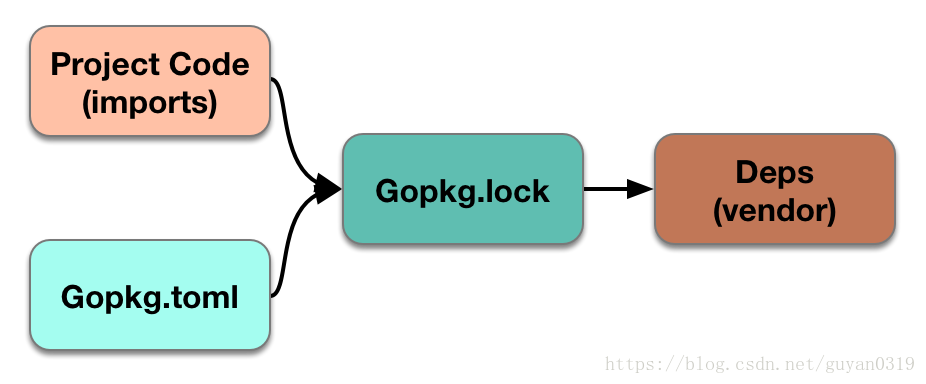
依赖管理
# 依赖管理帮助
dep help ensure
# 添加一条依赖
dep ensure -add github.com/bitly/go-simplejson
# 这里 @= 参数指定的是 某个 tag
dep ensure -add github.com/bitly/go-simplejson@=0.4.3
# 添加后一定记住执行 确保 同步
dep ensure
# 建议使用
dep ensure -v
#  删除没有用到的 package
dep prune -v
参数-v,是为了更好的查看执行过程,建议加上。
依赖更新
dep ensure -update -v
实例
下面通过实例展示dep具体的功能
在目录$GOPATH/src/test下,创建main.go文件
package main

import (
    "net/http"
    "os"

    "github.com/gorilla/mux"
)

func main() {
    r := mux.NewRouter()
    r.Handle("/", http.FileServer(http.Dir(".")))
    http.ListenAndServe(":"+os.Getenv("PORT"), r)
}
这个时候如果直接执行更新依赖
dep ensure -update -v
你会发现Gopkg.lock没有变化,仅Gopkg.toml和vendor发生了变。
Gopkg.toml
# This file is autogenerated, do not edit; changes may be undone by the next 'dep ensure'.


[[projects]]
  digest = "1:c79fb010be38a59d657c48c6ba1d003a8aa651fa56b579d959d74573b7dff8e1"
  name = "github.com/gorilla/context"
  packages = ["."]
  pruneopts = "UT"
  revision = "08b5f424b9271eedf6f9f0ce86cb9396ed337a42"
  version = "v1.1.1"

[[projects]]
  digest = "1:e73f5b0152105f18bc131fba127d9949305c8693f8a762588a82a48f61756f5f"
  name = "github.com/gorilla/mux"
  packages = ["."]
  pruneopts = "UT"
  revision = "e3702bed27f0d39777b0b37b664b6280e8ef8fbf"
  version = "v1.6.2"

[solve-meta]
  analyzer-name = "dep"
  analyzer-version = 1
  input-imports = ["github.com/gorilla/mux"]
  solver-name = "gps-cdcl"
  solver-version = 1
vendor下有一下文件
 $ tree
.
└── github.com
    └── gorilla
        ├── context
        │   ├── context.go
        │   ├── doc.go
        │   ├── LICENSE
        │   └── README.md
        └── mux
            ├── context_gorilla.go
            ├── context_native.go
            ├── doc.go
            ├── ISSUE_TEMPLATE.md
            ├── LICENSE
            ├── middleware.go
            ├── mux.go
            ├── README.md
            ├── regexp.go
            ├── route.go
            └── test_helpers.go
dep ensure -add 会更新Gopkg.toml和Gopkg.lock并安装依赖项至vendor/下,需要执行dep ensure -add ,以github.com/apodemakeles/ugo/time为例
dep ensure -add github.com/apodemakeles/ugo/time
这时候会报如下信息
"github.com/apodemakeles/ugo/time" is not imported by your project, and has been temporarily added to Gopkg.lock and vendor/.
If you run "dep ensure" again before actually importing it, it will disappear from Gopkg.lock and vendor/.
它说你没有在你的代码中使用这个新的依赖项。现在让我们来看看Gopkg.toml文件。
# Gopkg.toml example
#
# Refer to https://golang.github.io/dep/docs/Gopkg.toml.html
# for detailed Gopkg.toml documentation.
#
# required = ["github.com/user/thing/cmd/thing"]
# ignored = ["github.com/user/project/pkgX", "bitbucket.org/user/project/pkgA/pkgY"]
#
# [[constraint]]
#   name = "github.com/user/project"
#   version = "1.0.0"
#
# [[constraint]]
#   name = "github.com/user/project2"
#   branch = "dev"
#   source = "github.com/myfork/project2"
#
# [[override]]
#   name = "github.com/x/y"
#   version = "2.4.0"
#
# [prune]
#   non-go = false
#   go-tests = true
#   unused-packages = true


[prune]
  go-tests = true
  unused-packages = true


[[constraint]]
  name = "github.com/apodemakeles/ugo"
  version = "0.3.0"
这个时候Gopkg.toml文件多了[[constraint]]信息,同时在vendor文件夹和修改.lock文件中安装最新版本。这个时候执行dep ensure 会报错误
Warning: the following project(s) have [[constraint]] stanzas in Gopkg.toml:

  ✗  github.com/apodemakeles/ugo

However, these projects are not direct dependencies of the current project:
they are not imported in any .go files, nor are they in the 'required' list in
Gopkg.toml. Dep only applies [[constraint]] rules to direct dependencies, so
these rules will have no effect.

Either import/require packages from these projects so that they become direct
dependencies, or convert each [[constraint]] to an [[override]] to enforce rules
on these projects, if they happen to be transitive dependencies.
如果不想报错只需import代码中的依赖项,如下所示:
import "github.com/apodemakeles/ugo/time"
然后执行dep ensure。
一般在项目中新增代码,只需执行dep ensure,它将在vendor文件夹和修改.lock文件中安装最新版本。
查看依赖状态
通过执行dep status命令,将列出您的应用程序中使用的版本以及开发人员发布的最新版本。
PROJECT                     CONSTRAINT  VERSION  REVISION  LATEST  PKGS USED
github.com/gorilla/context  v1.1.1      v1.1.1   08b5f42   v1.1.1  1
github.com/gorilla/mux      v1.6.2      v1.6.2   e3702be   v1.6.2  1
删除依赖
修改Gopkg.toml文件相应内容,同时要保证代码中没有引用,再执行dep ensure 或dep ensure -update 均可。
参考
https://golang.github.io/dep/docs/introduction.html
https://jjude.com/go-dep/