
使用cquery:C++ language server

原文:使用cquery:C++ language server
C++代码索引工具现状
Tag system流派
- Universal Ctags很精妙,用正则表达式跳转,因此文档编辑后仍能使用。https://github.com/universal-ctags/ctags/blob/master/parsers/c.c 但不带引用,Vim会用二分查找,大约会有log2(size/4096)次seek。
- Cscope似乎已经荒废了。
- GNU GLOBAL
libparser/C.c
clang流派
- clang-tags荒废。
- YouCompleteMe不够好用,因为只处理单一translation unit,无法查找引用。
- clangd最有前景,有大厂大项目愿意采用。但尚无存储系统,实质上也无法处理多translation units。作为clang-tools-extra一部分,而clang+llvm构建/贡献门槛高([https://reviews.llvm.org/])。目前有尝试引入存储模型(MarkZ3),但目前设计较为复杂,而实际上不带garbage collection的
std::vector(cquery风格)足够应对大部分使用场景。很担心他们走上歧路。 - Google Kythe,(mostly) language-agnostic,概念复杂,配置困难。不重视language server protocol,当前仅提供
ReferencesProvider,HoverProvider,DefinitionProvider,且交互使用可能有极大延迟。大多数人并不在意C++ Haskell Python代码间无缝跳转。 - rtags可以查找引用,但每个translation unit 6个文件
info,symbols,symnames,targets,tokens,usrs(过多),没有使用in-memory索引,查找引用请求会读项目所有translation units的文件。导致性能低下https://github.com/Andersbakken/rtags/issues/1007。 - cquery现阶段的妥协。主要数据结构为不带garbage collection(变量/函数/类型等的id不会回收)的
std::vector(src/indexer.h)。有一些Emacs用户积极贡献code navigation功能。
IDE(Any sufficiently complicated IDE contains an ad-hoc, informally-specified, bug-ridden, slow implementation of half of C++.)
cquery安装、配置
https://github.com/jacobdufault/cquery。Arch Linux可用aur/cquery-git。
- 构建language server可执行文件
- 编辑器安装language client插件
- 配置language client,打开C++文件时运行language server可执行文件,通过stdio用JSON-RPC 2.0通信
- 光标移动时向language server发送
textDocument/hover请求,language server返回变量/函数声明信息 - 查找定义发送
textDocument/definition请求 - 查找引用发送
textDocument/references请求 - 查找当前文档定义的符号(通常是顶层的outline)发送
textDocument/documentSymbol请求 - 查找项目定义的符号(通常是顶层的outline)发送
textDocument/workspaceSymbol请求 - 补全
textDocument/completion - 文档编辑操作发送
textDocument/didChange
- 光标移动时向language server发送
Emacs
参照https://github.com/jacobdufault/cquery/wiki/Emacs配置。有几个相关组件:
- lsp-mode Emacs里的LSP客户端,language server中性。另有lsp-rust、lsp-haskell等language server相关设置。
- cquery Wiki里提到的
cquery.el。地位与lsp-rust、lsp-haskell等类似,把cquery适配到lsp-mode。另外提供一些LSP中未定义的cquery特定功能。 - lsp-ui lsp-mode有计划并入Emacs。其他UI相关或因协议等问题不适合在核心lsp-mode包的组件放在这里。当前有:
- lsp-flycheck 用language server的diagnostics信息实现flucheck的checker
- lsp-line 即时显示当前行所有标识符的
textDocument/hover信息 - lsp-xref 基于quick-peek的
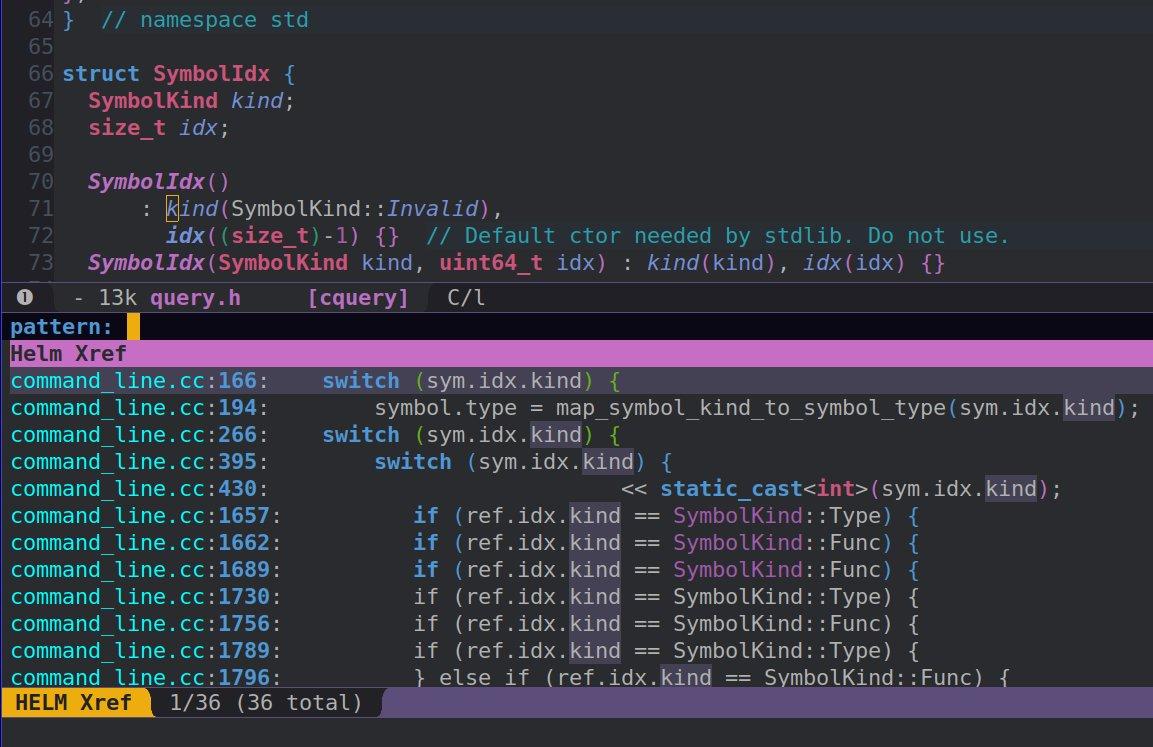
find-{definitions,references,apropos}。但对于这个功能我更偏好helm-xref - 未来可能添加更多code lens功能
xref.ellsp-mode设置xref-backend-functions,从language server获取定义、引用等信息后,交给xref.el显示。
xref.el
以下三个函数是最常用的交互命令。
xref-find-definitions(默认M-.),对应LSP中的textDocument/definitionxref-find-references(默认M-?),对应textDocument/referencesxref-find-apropos(默认C-M-.),对应workspace/symbol
注意,如果要使用xref-find-references,请阅读xref-prompt-for-identifier文档,并把xref-find-references添加进去。否则M-?会触发xref--read-identifier会在minibuffer中要求读入一个串,而键入的字串没有text properties提供位置信息,language server无法跳转到引用。我提交了一个bug到Emacs:https://debbugs.gnu.org/cgi/bugreport.cgi?bug=29619,但maintainer需要了解更多用户的反馈才会修改xref-prompt-for-identifier默认值。
cquery.el
cquery项目中的cquery.el适配cquery到lsp-mode,同时提供一些LSP协议未定义的功能。如inactive region,把preprocessor忽略掉的行用灰色显示:
我用以下C/C++ mode hook在项目根目录有compile_commands.json时自动启用`lsp-cquery-enable。
(defun my//enable-cquery-if-compile-commands-json ()
  (when-let
      ((_ (not (and (boundp 'lsp-mode) lsp-mode)))
       (_ (cl-notany (lambda (x) (string-match-p x buffer-file-name)) my-cquery-blacklist))
       (root (projectile-project-root))
       (_ (or (file-exists-p (concat root "compile_commands.json"))
              (file-exists-p (concat root ".cquery")))))
    (lsp-cquery-enable)
    (lsp-enable-imenu)))
helm-xref
helm用户可以考虑安装helm-xref,(setq xref-show-xrefs-function 'helm-xref-show-xrefs)即可。xref-find-{definitions,references,apropos}会用helm显示,替代xref.el的界面。
xref的双向jump list
我喜欢查找定义、引用的jump list和正常jump list(Evil中C-o C-i)分离。因为查找定义/引用后会进行一些局部跳转,喜欢有快捷键回到定义/引用跳转前的位置。 Emacs Lisp dynamic scoping使得我们可以很容易复用evil-jumps做一个用于xref的jump list,同时还支持双向移动,比xref.el中的xref-pop-marker-stack更方便。
(defmacro my-xref//with-evil-jumps (&rest body)
  "Make `evil-jumps.el' commands work on `my-xref--jumps'."
  (declare (indent 1))
  `(let ((evil--jumps-window-jumps ,my-xref--jumps))
     ,@body))
(with-eval-after-load 'evil-jumps
  (evil-define-motion my-xref/evil-jump-backward (count)
    (my-xref//with-evil-jumps
        (evil--jump-backward count)
      (run-hooks 'xref-after-return-hook)))
  (evil-define-motion my-xref/evil-jump-forward (count)
    (my-xref//with-evil-jumps
        (evil--jump-forward count)
      (run-hooks 'xref-after-return-hook))))
其他
- lsp-mode中的
lsp-imenu.el用imenu来显示textDocument/documentSymbol信息。跳转到当前档案的符号很方便。 - LSP生态系统解决的一大痛点是以前对于不同语言,要使用不同工具,设置不同快捷键。用了language client就可以统一了。
注意textDocument/references协议中定义返回结果为Location[] | null,只含位置信息,不包含代码行内容。显示行内容是lsp-mode做的。
https://github.com/MaskRay/Config/blob/master/home/.emacs.d/layers/%2Bmy/my-code/funcs.el
- 希望spacemacs支持LSP。
reference-handler(类似于跳转到定义的jump-handler)也很有用:https://github.com/syl20bnr/spacemacs/pull/9911 - lsp-mode和ggtags都会
(setq-local eldoc-documentation-function ...),对于这类minor-mode冲突问题,如果能设置优先级就能优雅解决。
Neovim
参照https://github.com/autozimu/LanguageClient-neovim/wiki/cquery
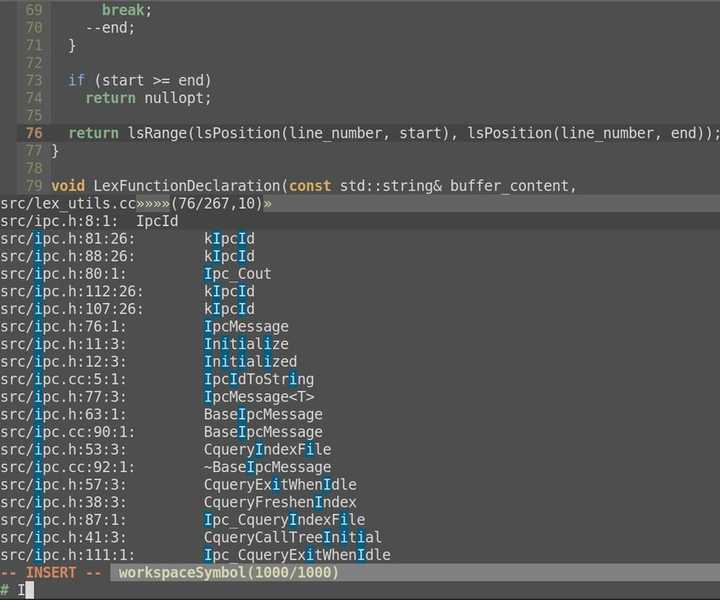
nn <leader>ji :Denite documentSymbol<cr>
nn <leader>jI :Denite workspaceSymbol<cr>
" 终端限制,<C-,>不可用。ord(`,`) & 64为0无法表示
nn <M-,> :Denite references<cr>
nn <silent> <C-j> :MarkPush<cr>:call LanguageClient_textDocument_definition()<cr>
不清楚怎么把定义/引用改造成使用可双向移动的jump list。
问题
- Task lists https://github.com/jacobdufault/cquery/issues/30 Polish before publishing (to GitHub Marketplace)
- libclang多线程parse translation unit(索引主要瓶颈)有race condition https://github.com/jacobdufault/cquery/issues/43#issuecomment-347614504。若采用多进程模型,很多轻量级数据库不支持或有较难处理的问题(如果有需求把现在in-memory+JSON改成有其他存储模型)。注记,
SQLITE_ENABLE_LOCKING_STYLE、flock很难。
其他
索引Linux kernel
wget 'https://git.archlinux.org/svntogit/packages.git/plain/trunk/config?h=packages/linux' -O .config
yes '' | make config
bear make -j bzImage modules
生成3GiB文件。
查看LSP requests/responses
sudo sysdig -As999 –unbuffered -p ‘%evt.type %evt.buffer’ “proc.pid=$(pgrep -fn build/app) and fd.type=pipe” | egrep -v ‘^Content|^$’
生成compile_commands.json,参考https://github.com/jacobdufault/cquery/wiki。
希望有朝一日Debug Protocol也能获得重视,https://github.com/Microsoft/vscode-debugadapter-node/blob/master/protocol/src/debugProtocol.ts,让realgud轻松一点。
和YouCompleteMe等项目一样,cquery默认下载prebuilt clang+llvm,即.h .so .a。用户不需要编译完整的llvm,开发门槛比clangd低。