
C++连接CTP接口实现简单量化交易(行情、交易、k线、策略)
C++连接CTP接口实现简单量化交易(行情、交易、k线、策略)
对于量化交易来说,量化策略和技术系统缺一不可,为了知其所以然,本文实现了一个C++连接CTP接口进行仿真交易的demo,从接收行情、下订单、数据处理到添加策略、挂载运行交易等多个环节来看一下量化交易的最简单流程,管中窥豹,一探究竟。
准备工作
交易所接口
这里使用上期所提供的CTP接口API,通过CTP可以连接交易所进行行情接收交易。下载地址:CTP下载
本文使用的win32版本的,linux版本用法类似。
CTP接口包含以下内容:
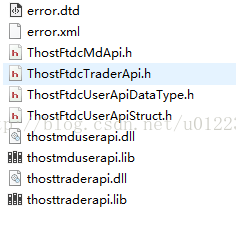
- ThostFtdcTraderApi.h:C++头文件,包含交易相关的指令,如报单。
- ThostFtdcMdApi.h:C++头文件,包含获取行情相关的指令。
- ThostFtdcUserApiStruct.h:包含了所有用到的数据结构。
- ThostFtdcUserApiDataType.h:包含了所有用到的数据类型。
- thosttraderapi.lib、thosttraderapi.dll:交易部分的动态链接库和静态链接库。
- thostmduserapi.lib、thostmduserapi.dll:行情部分的动态链接库和静态链接库。
- error.dtd、error.xml:包含所有可能的错误信息。
CThostFtdcMdApi接口和CThostFtdcTraderApi两个头文件,一个处理行情,一个处理交易。
期货账户
要连接期货交易所交易,需要开设自己的账户,实现期货交易、银期转账、保证金等功能,由于小白一般不会用实盘资金交易,所以此处推荐用上期所提供的simnow虚拟交易平台simnow申请一个虚拟账户。
SIMNOW提供两类数据前置地址:
(1)交易时段的地址,如09:00-15:00和21:00-02:30,使用第一套地址,这些数据是真实的行情数据,只是时间上比真实的行情会有延迟30秒左右(SIMNOW从交易所接收后转发出来的)。
(2)非交易时段地址,这时的数据是历史行情的播放,比如昨天的数据之类的,可以用来做程序调试。
建议选择申请那个7×24行情的账户,便于开发调试。
开发步骤
工程总览
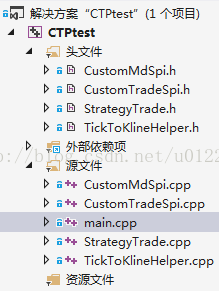
其中,
- CTP的API文件配置到工程
- CustomMdSpi.h,CustomMdSpi.cpp是派生的行情回调类
- CustomTradeSpi.h,CustomTradeSpi.cpp是派生的交易回调类
- TickToKlineHelper.h,TickToKlineHelper.cpp是处理时序数据,转换成K线的类
- StrategyTrade.h,StrategyTrade.cpp是策略类
- main.cpp是程序的入口
一个简单的程序化交易系统需要完成的业务可以划分为:
1.基本操作,比如登录,订阅等;
2.行情操作,比如对行情数据的接收,存储等
3.订单操作,比如报单;对报单,成交状况的查询;报单,成交状况的私有回报等。
4.数据监听和处理操作,比如接收到新数据之后的统计处理,满足统计条件后的报单处理(其实这里就是我们的策略所在)
导入CTP接口库
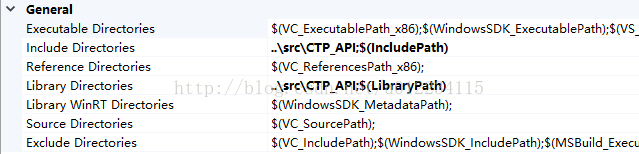
- // 链接库
- #pragma comment (lib, “thostmduserapi.lib”)
- #pragma comment (lib, “thosttraderapi.lib”)
全局参数
- // —- 全局变量 —- //
- // 公共参数
- TThostFtdcBrokerIDType gBrokerID = “9999”; // 模拟经纪商代码
- TThostFtdcInvestorIDType gInvesterID = “”; // 投资者账户名
- TThostFtdcPasswordType gInvesterPassword = “”; // 投资者密码
- // 行情参数
- CThostFtdcMdApi *g_pMdUserApi = nullptr; // 行情指针
- char gMdFrontAddr[] = “tcp://180.168.146.187:10010”; // 模拟行情前置地址
- char *g_pInstrumentID[] = {“TF1706”, “zn1705”, “cs1801”, “CF705”}; // 行情合约代码列表,中、上、大、郑交易所各选一种
- int instrumentNum = 4; // 行情合约订阅数量
- unordered_map<string, TickToKlineHelper> g_KlineHash; // 不同合约的k线存储表
- // 交易参数
- CThostFtdcTraderApi *g_pTradeUserApi = nullptr; // 交易指针
- char gTradeFrontAddr[] = “tcp://180.168.146.187:10001”; // 模拟交易前置地址
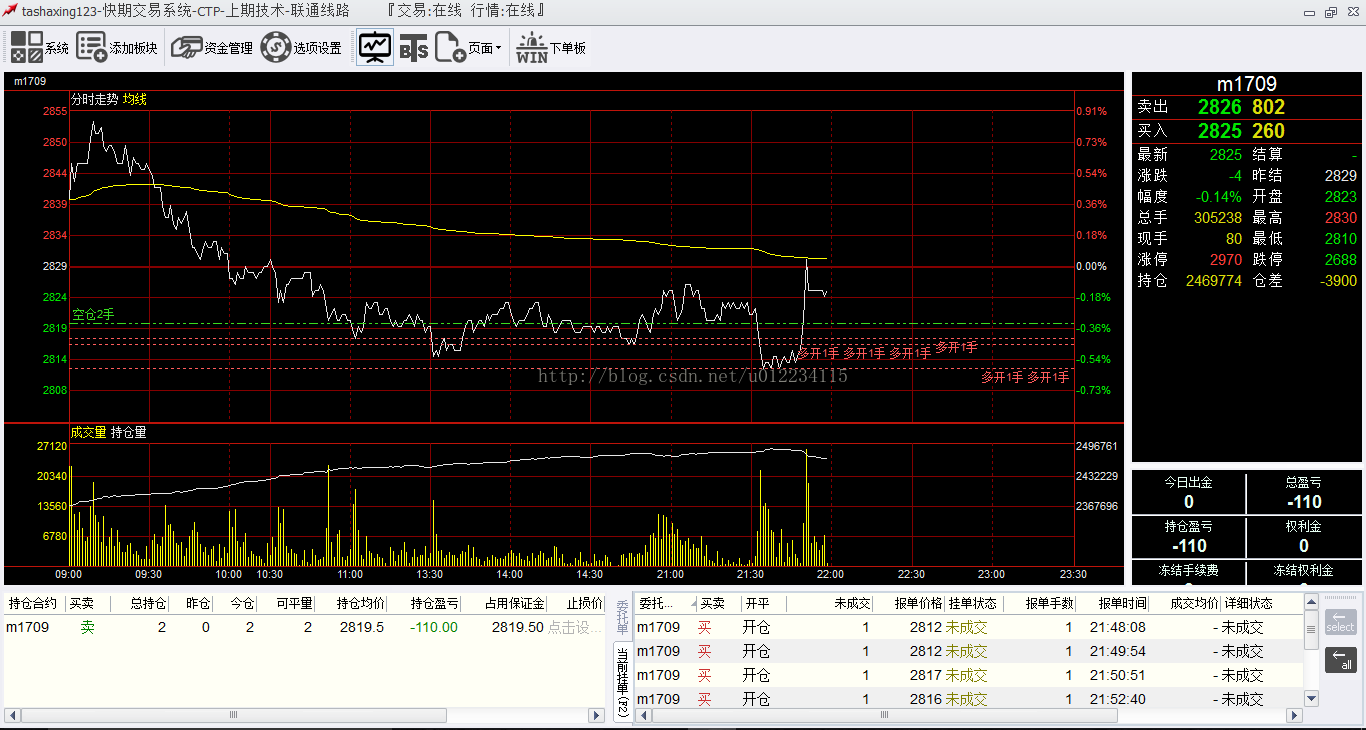
- TThostFtdcInstrumentIDType g_pTradeInstrumentID = “m1709”; // 所交易的合约代码
- TThostFtdcDirectionType gTradeDirection = THOST_FTDC_D_Sell; // 买卖方向
- TThostFtdcPriceType gLimitPrice = 2818; // 交易价格<span style=”font-family:’Microsoft YaHei’;”>
- </span>
这里只是简单的写一下,真实完整的交易系统中,一般用配置文件,有用户去定制
行情回调类
继承CThostFtdcMdSpi实现自己的行情回调类CustomMdSpi,在系统运行时这些重写的函数会被CTP的系统api回调从而实现个性化行情
CustomMdSpi头文件
- #pragma once
- // —- 派生的行情类 —- //
- #include <vector>
- #include “CTP_API/ThostFtdcMdApi.h”
- class CustomMdSpi: public CThostFtdcMdSpi
- {
- // —- 继承自CTP父类的回调接口并实现 —- //
- public:
- ///当客户端与交易后台建立起通信连接时(还未登录前),该方法被调用。
- void OnFrontConnected();
- ///当客户端与交易后台通信连接断开时,该方法被调用。当发生这个情况后,API会自动重新连接,客户端可不做处理。
- ///@param nReason 错误原因
- /// 0x1001 网络读失败
- /// 0x1002 网络写失败
- /// 0x2001 接收心跳超时
- /// 0x2002 发送心跳失败
- /// 0x2003 收到错误报文
- void OnFrontDisconnected(int nReason);
- ///心跳超时警告。当长时间未收到报文时,该方法被调用。
- ///@param nTimeLapse 距离上次接收报文的时间
- void OnHeartBeatWarning(int nTimeLapse);
- ///登录请求响应
- void OnRspUserLogin(CThostFtdcRspUserLoginField *pRspUserLogin, CThostFtdcRspInfoField *pRspInfo, int nRequestID, bool bIsLast);
- ///登出请求响应
- void OnRspUserLogout(CThostFtdcUserLogoutField *pUserLogout, CThostFtdcRspInfoField *pRspInfo, int nRequestID, bool bIsLast);
- ///错误应答
- void OnRspError(CThostFtdcRspInfoField *pRspInfo, int nRequestID, bool bIsLast);
- ///订阅行情应答
- void OnRspSubMarketData(CThostFtdcSpecificInstrumentField *pSpecificInstrument, CThostFtdcRspInfoField *pRspInfo, int nRequestID, bool bIsLast);
- ///取消订阅行情应答
- void OnRspUnSubMarketData(CThostFtdcSpecificInstrumentField *pSpecificInstrument, CThostFtdcRspInfoField *pRspInfo, int nRequestID, bool bIsLast);
- ///订阅询价应答
- void OnRspSubForQuoteRsp(CThostFtdcSpecificInstrumentField *pSpecificInstrument, CThostFtdcRspInfoField *pRspInfo, int nRequestID, bool bIsLast);
- ///取消订阅询价应答
- void OnRspUnSubForQuoteRsp(CThostFtdcSpecificInstrumentField *pSpecificInstrument, CThostFtdcRspInfoField *pRspInfo, int nRequestID, bool bIsLast);
- ///深度行情通知
- void OnRtnDepthMarketData(CThostFtdcDepthMarketDataField *pDepthMarketData);
- ///询价通知
- void OnRtnForQuoteRsp(CThostFtdcForQuoteRspField *pForQuoteRsp);
- };
都是重写回调函数
连接应答
- // 连接成功应答
- void CustomMdSpi::OnFrontConnected()
- {
- std::cout << “=====建立网络连接成功=====” << std::endl;
- // 开始登录
- CThostFtdcReqUserLoginField loginReq;
- memset(&loginReq, 0, sizeof(loginReq));
- strcpy(loginReq.BrokerID, gBrokerID);
- strcpy(loginReq.UserID, gInvesterID);
- strcpy(loginReq.Password, gInvesterPassword);
- static int requestID = 0; // 请求编号
- int rt = g_pMdUserApi->ReqUserLogin(&loginReq, requestID);
- if (!rt)
- std::cout << “>>>>>>发送登录请求成功” << std::endl;
- else
- std::cerr << “—>>>发送登录请求失败” << std::endl;
- }
登录应答
- // 登录应答
- void CustomMdSpi::OnRspUserLogin(
- CThostFtdcRspUserLoginField *pRspUserLogin,
- CThostFtdcRspInfoField *pRspInfo,
- int nRequestID,
- bool bIsLast)
- {
- bool bResult = pRspInfo && (pRspInfo->ErrorID != 0);
- if (!bResult)
- {
- std::cout << “=====账户登录成功=====” << std::endl;
- std::cout << “交易日: “ << pRspUserLogin->TradingDay << std::endl;
- std::cout << “登录时间: “ << pRspUserLogin->LoginTime << std::endl;
- std::cout << “经纪商: “ << pRspUserLogin->BrokerID << std::endl;
- std::cout << “帐户名: “ << pRspUserLogin->UserID << std::endl;
- // 开始订阅行情
- int rt = g_pMdUserApi->SubscribeMarketData(g_pInstrumentID, instrumentNum);
- if (!rt)
- std::cout << “>>>>>>发送订阅行情请求成功” << std::endl;
- else
- std::cerr << “—>>>发送订阅行情请求失败” << std::endl;
- }
- else
- std::cerr << “返回错误—>>> ErrorID=” << pRspInfo->ErrorID << “, ErrorMsg=” << pRspInfo->ErrorMsg << std::endl;
- }<span style=“font-family:’Microsoft YaHei’;”>
- </span>
订阅行情应答
- // 订阅行情应答
- void CustomMdSpi::OnRspSubMarketData(
- CThostFtdcSpecificInstrumentField *pSpecificInstrument,
- CThostFtdcRspInfoField *pRspInfo,
- int nRequestID,
- bool bIsLast)
- {
- bool bResult = pRspInfo && (pRspInfo->ErrorID != 0);
- if (!bResult)
- {
- std::cout << “=====订阅行情成功=====” << std::endl;
- std::cout << “合约代码: “ << pSpecificInstrument->InstrumentID << std::endl;
- // 如果需要存入文件或者数据库,在这里创建表头,不同的合约单独存储
- char filePath[100] = {‘\0’};
- sprintf(filePath, “%s_market_data.csv”, pSpecificInstrument->InstrumentID);
- std::ofstream outFile;
- outFile.open(filePath, std::ios::out); // 新开文件
- outFile << “合约代码” << “,”
- << “更新时间” << “,”
- << “最新价” << “,”
- << “成交量” << “,”
- << “买价一” << “,”
- << “买量一” << “,”
- << “卖价一” << “,”
- << “卖量一” << “,”
- << “持仓量” << “,”
- << “换手率”
- << std::endl;
- outFile.close();
- }
- else
- std::cerr << “返回错误—>>> ErrorID=” << pRspInfo->ErrorID << “, ErrorMsg=” << pRspInfo->ErrorMsg << std::endl;
- }
- 因为是异步接口,这里连接、登录、订阅行情是一步套一步来调用的,在运行过程中,会启动一个行情线程,交易所每500ms会推送一个订阅的行情tick数据,因此,某些接口会被连续间隔调用,直到连接关闭
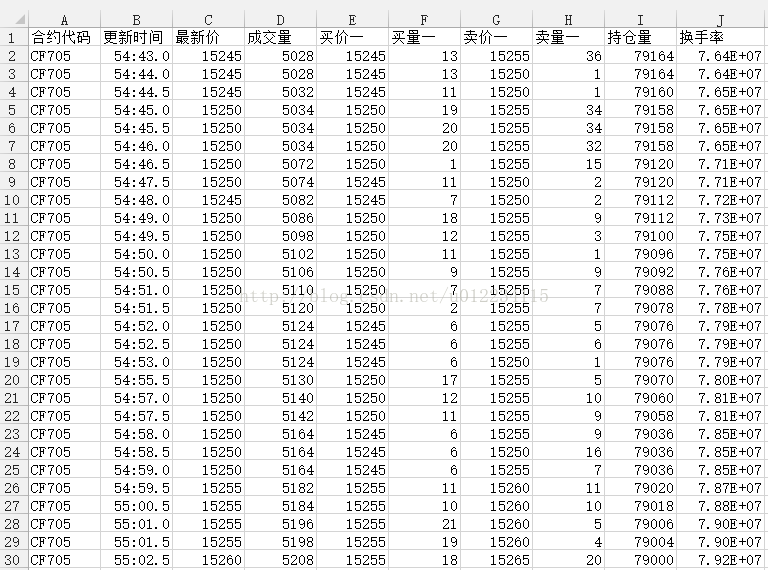
- 收到行情后除了存在内存,也可以用文本文件或者数据库等形式存储起来,在这里创建初始文件或者建库
- // 行情详情通知
- void CustomMdSpi::OnRtnDepthMarketData(CThostFtdcDepthMarketDataField *pDepthMarketData)
- {
- // 打印行情,字段较多,截取部分
- std::cout << “=====获得深度行情=====” << std::endl;
- std::cout << “交易日: “ << pDepthMarketData->TradingDay << std::endl;
- std::cout << “交易所代码: “ << pDepthMarketData->ExchangeID << std::endl;
- std::cout << “合约代码: “ << pDepthMarketData->InstrumentID << std::endl;
- std::cout << “合约在交易所的代码: “ << pDepthMarketData->ExchangeInstID << std::endl;
- std::cout << “最新价: “ << pDepthMarketData->LastPrice << std::endl;
- std::cout << “数量: “ << pDepthMarketData->Volume << std::endl;
- // 如果只获取某一个合约行情,可以逐tick地存入文件或数据库
- char filePath[100] = {‘\0’};
- sprintf(filePath, “%s_market_data.csv”, pDepthMarketData->InstrumentID);
- std::ofstream outFile;
- outFile.open(filePath, std::ios::app); // 文件追加写入
- outFile << pDepthMarketData->InstrumentID << “,”
- << pDepthMarketData->UpdateTime << “.” << pDepthMarketData->UpdateMillisec << “,”
- << pDepthMarketData->LastPrice << “,”
- << pDepthMarketData->Volume << “,”
- << pDepthMarketData->BidPrice1 << “,”
- << pDepthMarketData->BidVolume1 << “,”
- << pDepthMarketData->AskPrice1 << “,”
- << pDepthMarketData->AskVolume1 << “,”
- << pDepthMarketData->OpenInterest << “,”
- << pDepthMarketData->Turnover << std::endl;
- outFile.close();
- // 计算实时k线
- std::string instrumentKey = std::string(pDepthMarketData->InstrumentID);
- if (g_KlineHash.find(instrumentKey) == g_KlineHash.end())
- g_KlineHash[instrumentKey] = TickToKlineHelper();
- g_KlineHash[instrumentKey].KLineFromRealtimeData(pDepthMarketData);
- // 取消订阅行情
- //int rt = g_pMdUserApi->UnSubscribeMarketData(g_pInstrumentID, instrumentNum);
- //if (!rt)
- // std::cout << “>>>>>>发送取消订阅行情请求成功” << std::endl;
- //else
- // std::cerr << “—>>>发送取消订阅行情请求失败” << std::endl;
- }
- 每个tick世间节点系统都会调用这个函数,推送具体的行情截面数据
- 可以在此处将行情写到本地,或者做一些数据处理(例如实时K线计算,判断是否触发策略等)
交易回调类
同理,也需要继承CThostFtdcTraderSpi来实现自己的CustomTradeSpi类,用于交易下单、报单等操作的回调
CustomTradeSpi头文件
- #pragma once
- // —- 派生的交易类 —- //
- #include “CTP_API/ThostFtdcTraderApi.h”
- class CustomTradeSpi : public CThostFtdcTraderSpi
- {
- // —- ctp_api部分回调接口 —- //
- public:
- ///当客户端与交易后台建立起通信连接时(还未登录前),该方法被调用。
- void OnFrontConnected();
- ///登录请求响应
- void OnRspUserLogin(CThostFtdcRspUserLoginField *pRspUserLogin, CThostFtdcRspInfoField *pRspInfo, int nRequestID, bool bIsLast);
- ///错误应答
- void OnRspError(CThostFtdcRspInfoField *pRspInfo, int nRequestID, bool bIsLast);
- ///当客户端与交易后台通信连接断开时,该方法被调用。当发生这个情况后,API会自动重新连接,客户端可不做处理。
- void OnFrontDisconnected(int nReason);
- ///心跳超时警告。当长时间未收到报文时,该方法被调用。
- void OnHeartBeatWarning(int nTimeLapse);
- ///登出请求响应
- void OnRspUserLogout(CThostFtdcUserLogoutField *pUserLogout, CThostFtdcRspInfoField *pRspInfo, int nRequestID, bool bIsLast);
- ///投资者结算结果确认响应
- void OnRspSettlementInfoConfirm(CThostFtdcSettlementInfoConfirmField *pSettlementInfoConfirm, CThostFtdcRspInfoField *pRspInfo, int nRequestID, bool bIsLast);
- ///请求查询合约响应
- void OnRspQryInstrument(CThostFtdcInstrumentField *pInstrument, CThostFtdcRspInfoField *pRspInfo, int nRequestID, bool bIsLast);
- ///请求查询资金账户响应
- void OnRspQryTradingAccount(CThostFtdcTradingAccountField *pTradingAccount, CThostFtdcRspInfoField *pRspInfo, int nRequestID, bool bIsLast);
- ///请求查询投资者持仓响应
- void OnRspQryInvestorPosition(CThostFtdcInvestorPositionField *pInvestorPosition, CThostFtdcRspInfoField *pRspInfo, int nRequestID, bool bIsLast);
- ///报单录入请求响应
- void OnRspOrderInsert(CThostFtdcInputOrderField *pInputOrder, CThostFtdcRspInfoField *pRspInfo, int nRequestID, bool bIsLast);
- ///报单操作请求响应
- void OnRspOrderAction(CThostFtdcInputOrderActionField *pInputOrderAction, CThostFtdcRspInfoField *pRspInfo, int nRequestID, bool bIsLast);
- ///报单通知
- void OnRtnOrder(CThostFtdcOrderField *pOrder);
- ///成交通知
- void OnRtnTrade(CThostFtdcTradeField *pTrade);
- // —- 自定义函数 —- //
- public:
- bool loginFlag; // 登陆成功的标识
- void reqOrderInsert(
- TThostFtdcInstrumentIDType instrumentID,
- TThostFtdcPriceType price,
- TThostFtdcVolumeType volume,
- TThostFtdcDirectionType direction); // 个性化报单录入,外部调用
- private:
- void reqUserLogin(); // 登录请求
- void reqUserLogout(); // 登出请求
- void reqSettlementInfoConfirm(); // 投资者结果确认
- void reqQueryInstrument(); // 请求查询合约
- void reqQueryTradingAccount(); // 请求查询资金帐户
- void reqQueryInvestorPosition(); // 请求查询投资者持仓
- void reqOrderInsert(); // 请求报单录入
- void reqOrderAction(CThostFtdcOrderField *pOrder); // 请求报单操作
- bool isErrorRspInfo(CThostFtdcRspInfoField *pRspInfo); // 是否收到错误信息
- bool isMyOrder(CThostFtdcOrderField *pOrder); // 是否我的报单回报
- bool isTradingOrder(CThostFtdcOrderField *pOrder); // 是否正在交易的报单
- };
除了重写的基类函数,还自己封装一些主动调用的操作函数,比如登入登出、下单报单、查询报单等
登录应答
- void CustomTradeSpi::OnRspUserLogin(
- CThostFtdcRspUserLoginField *pRspUserLogin,
- CThostFtdcRspInfoField *pRspInfo,
- int nRequestID,
- bool bIsLast)
- {
- if (!isErrorRspInfo(pRspInfo))
- {
- std::cout << “=====账户登录成功=====” << std::endl;
- loginFlag = true;
- std::cout << “交易日: “ << pRspUserLogin->TradingDay << std::endl;
- std::cout << “登录时间: “ << pRspUserLogin->LoginTime << std::endl;
- std::cout << “经纪商: “ << pRspUserLogin->BrokerID << std::endl;
- std::cout << “帐户名: “ << pRspUserLogin->UserID << std::endl;
- // 保存会话参数
- trade_front_id = pRspUserLogin->FrontID;
- session_id = pRspUserLogin->SessionID;
- strcpy(order_ref, pRspUserLogin->MaxOrderRef);
- // 投资者结算结果确认
- reqSettlementInfoConfirm();
- }
- }
查询投资者结算结果应答
- void CustomTradeSpi::OnRspSettlementInfoConfirm(
- CThostFtdcSettlementInfoConfirmField *pSettlementInfoConfirm,
- CThostFtdcRspInfoField *pRspInfo,
- int nRequestID,
- bool bIsLast)
- {
- if (!isErrorRspInfo(pRspInfo))
- {
- std::cout << “=====投资者结算结果确认成功=====” << std::endl;
- std::cout << “确认日期: “ << pSettlementInfoConfirm->ConfirmDate << std::endl;
- std::cout << “确认时间: “ << pSettlementInfoConfirm->ConfirmTime << std::endl;
- // 请求查询合约
- reqQueryInstrument();
- }
- }
查询合约应答
- void CustomTradeSpi::OnRspQryInstrument(
- CThostFtdcInstrumentField *pInstrument,
- CThostFtdcRspInfoField *pRspInfo,
- int nRequestID,
- bool bIsLast)
- {
- if (!isErrorRspInfo(pRspInfo))
- {
- std::cout << “=====查询合约结果成功=====” << std::endl;
- std::cout << “交易所代码: “ << pInstrument->ExchangeID << std::endl;
- std::cout << “合约代码: “ << pInstrument->InstrumentID << std::endl;
- std::cout << “合约在交易所的代码: “ << pInstrument->ExchangeInstID << std::endl;
- std::cout << “执行价: “ << pInstrument->StrikePrice << std::endl;
- std::cout << “到期日: “ << pInstrument->EndDelivDate << std::endl;
- std::cout << “当前交易状态: “ << pInstrument->IsTrading << std::endl;
- // 请求查询投资者资金账户
- reqQueryTradingAccount();
- }
- }
查询投资者资金帐户应答
- void CustomTradeSpi::OnRspQryTradingAccount(
- CThostFtdcTradingAccountField *pTradingAccount,
- CThostFtdcRspInfoField *pRspInfo,
- int nRequestID,
- bool bIsLast)
- {
- if (!isErrorRspInfo(pRspInfo))
- {
- std::cout << “=====查询投资者资金账户成功=====” << std::endl;
- std::cout << “投资者账号: “ << pTradingAccount->AccountID << std::endl;
- std::cout << “可用资金: “ << pTradingAccount->Available << std::endl;
- std::cout << “可取资金: “ << pTradingAccount->WithdrawQuota << std::endl;
- std::cout << “当前保证金: “ << pTradingAccount->CurrMargin << std::endl;
- std::cout << “平仓盈亏: “ << pTradingAccount->CloseProfit << std::endl;
- // 请求查询投资者持仓
- reqQueryInvestorPosition();
- }
- }
查询投资者持仓应答
- void CustomTradeSpi::OnRspQryInvestorPosition(
- CThostFtdcInvestorPositionField *pInvestorPosition,
- CThostFtdcRspInfoField *pRspInfo,
- int nRequestID,
- bool bIsLast)
- {
- if (!isErrorRspInfo(pRspInfo))
- {
- std::cout << “=====查询投资者持仓成功=====” << std::endl;
- if (pInvestorPosition)
- {
- std::cout << “合约代码: “ << pInvestorPosition->InstrumentID << std::endl;
- std::cout << “开仓价格: “ << pInvestorPosition->OpenAmount << std::endl;
- std::cout << “开仓量: “ << pInvestorPosition->OpenVolume << std::endl;
- std::cout << “开仓方向: “ << pInvestorPosition->PosiDirection << std::endl;
- std::cout << “占用保证金:” << pInvestorPosition->UseMargin << std::endl;
- }
- else
- std::cout << “—–>该合约未持仓” << std::endl;
- // 报单录入请求(这里是一部接口,此处是按顺序执行)
- /*if (loginFlag)
- reqOrderInsert();*/
- if (loginFlag)
- reqOrderInsert(g_pTradeInstrumentID, gLimitPrice, 1, gTradeDirection); // 自定义一笔交易
- // 策略交易
- /*std::cout << “=====开始进入策略交易=====” << std::endl;
- while (loginFlag)
- StrategyCheckAndTrade(g_pTradeInstrumentID, this);*/
- }
- }
这里把下单录入的操作放在了持仓结果出来之后的回调里面,策略交易也简单的放在了这里,真实的情况下,应该是由行情触发某个策略条件开一个线程进行策略交易
下单操作
- void CustomTradeSpi::reqOrderInsert(
- TThostFtdcInstrumentIDType instrumentID,
- TThostFtdcPriceType price,
- TThostFtdcVolumeType volume,
- TThostFtdcDirectionType direction)
- {
- CThostFtdcInputOrderField orderInsertReq;
- memset(&orderInsertReq, 0, sizeof(orderInsertReq));
- ///经纪公司代码
- strcpy(orderInsertReq.BrokerID, gBrokerID);
- ///投资者代码
- strcpy(orderInsertReq.InvestorID, gInvesterID);
- ///合约代码
- strcpy(orderInsertReq.InstrumentID, instrumentID);
- ///报单引用
- strcpy(orderInsertReq.OrderRef, order_ref);
- ///报单价格条件: 限价
- orderInsertReq.OrderPriceType = THOST_FTDC_OPT_LimitPrice;
- ///买卖方向:
- orderInsertReq.Direction = direction;
- ///组合开平标志: 开仓
- orderInsertReq.CombOffsetFlag[0] = THOST_FTDC_OF_Open;
- ///组合投机套保标志
- orderInsertReq.CombHedgeFlag[0] = THOST_FTDC_HF_Speculation;
- ///价格
- orderInsertReq.LimitPrice = price;
- ///数量:1
- orderInsertReq.VolumeTotalOriginal = volume;
- ///有效期类型: 当日有效
- orderInsertReq.TimeCondition = THOST_FTDC_TC_GFD;
- ///成交量类型: 任何数量
- orderInsertReq.VolumeCondition = THOST_FTDC_VC_AV;
- ///最小成交量: 1
- orderInsertReq.MinVolume = 1;
- ///触发条件: 立即
- orderInsertReq.ContingentCondition = THOST_FTDC_CC_Immediately;
- ///强平原因: 非强平
- orderInsertReq.ForceCloseReason = THOST_FTDC_FCC_NotForceClose;
- ///自动挂起标志: 否
- orderInsertReq.IsAutoSuspend = 0;
- ///用户强评标志: 否
- orderInsertReq.UserForceClose = 0;
- static int requestID = 0; // 请求编号
- int rt = g_pTradeUserApi->ReqOrderInsert(&orderInsertReq, ++requestID);
- if (!rt)
- std::cout << “>>>>>>发送报单录入请求成功” << std::endl;
- else
- std::cerr << “—>>>发送报单录入请求失败” << std::endl;
- }
通过重载写了两个函数,一个是用默认参数下单,一个可以传参下单,比如设定合约代码、价格、数量等报单操作
- void CustomTradeSpi::reqOrderAction(CThostFtdcOrderField *pOrder)
- {
- static bool orderActionSentFlag = false; // 是否发送了报单
- if (orderActionSentFlag)
- return;
- CThostFtdcInputOrderActionField orderActionReq;
- memset(&orderActionReq, 0, sizeof(orderActionReq));
- ///经纪公司代码
- strcpy(orderActionReq.BrokerID, pOrder->BrokerID);
- ///投资者代码
- strcpy(orderActionReq.InvestorID, pOrder->InvestorID);
- ///报单操作引用
- // TThostFtdcOrderActionRefType OrderActionRef;
- ///报单引用
- strcpy(orderActionReq.OrderRef, pOrder->OrderRef);
- ///请求编号
- // TThostFtdcRequestIDType RequestID;
- ///前置编号
- orderActionReq.FrontID = trade_front_id;
- ///会话编号
- orderActionReq.SessionID = session_id;
- ///交易所代码
- // TThostFtdcExchangeIDType ExchangeID;
- ///报单编号
- // TThostFtdcOrderSysIDType OrderSysID;
- ///操作标志
- orderActionReq.ActionFlag = THOST_FTDC_AF_Delete;
- ///价格
- // TThostFtdcPriceType LimitPrice;
- ///数量变化
- // TThostFtdcVolumeType VolumeChange;
- ///用户代码
- // TThostFtdcUserIDType UserID;
- ///合约代码
- strcpy(orderActionReq.InstrumentID, pOrder->InstrumentID);
- static int requestID = 0; // 请求编号
- int rt = g_pTradeUserApi->ReqOrderAction(&orderActionReq, ++requestID);
- if (!rt)
- std::cout << “>>>>>>发送报单操作请求成功” << std::endl;
- else
- std::cerr << “—>>>发送报单操作请求失败” << std::endl;
- orderActionSentFlag = true;
- }
主要是对于未成交的订单进行编辑或者撤销操作
报单应答
- void CustomTradeSpi::OnRtnOrder(CThostFtdcOrderField *pOrder)
- {
- char str[10];
- sprintf(str, “%d”, pOrder->OrderSubmitStatus);
- int orderState = atoi(str) – 48; //报单状态0=已经提交,3=已经接受
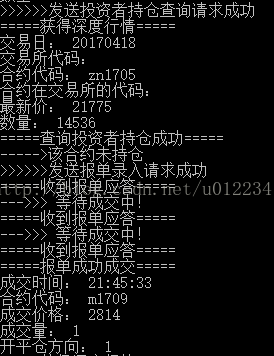
- std::cout << “=====收到报单应答=====” << std::endl;
- if (isMyOrder(pOrder))
- {
- if (isTradingOrder(pOrder))
- {
- std::cout << “—>>> 等待成交中!” << std::endl;
- //reqOrderAction(pOrder); // 这里可以撤单
- //reqUserLogout(); // 登出测试
- }
- else if (pOrder->OrderStatus == THOST_FTDC_OST_Canceled)
- std::cout << “—>>> 撤单成功!” << std::endl;
- }
- }
- void CustomTradeSpi::OnRtnTrade(CThostFtdcTradeField *pTrade)
- {
- std::cout << “=====报单成功成交=====” << std::endl;
- std::cout << “成交时间: “ << pTrade->TradeTime << std::endl;
- std::cout << “合约代码: “ << pTrade->InstrumentID << std::endl;
- std::cout << “成交价格: “ << pTrade->Price << std::endl;
- std::cout << “成交量: “ << pTrade->Volume << std::endl;
- std::cout << “开平仓方向: “ << pTrade->Direction << std::endl;
- }
等待成交进行轮询可以选择报单操作,成交完成后的应答
时间序列转K线
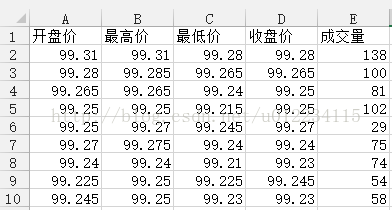
从交易拿到的tick数据是时间序列数据,在证券交易中其实还需要根据时间序列算出一些技术指标数据,例如MACD,KDJ、K线等,这里简单地对数据做一下处理,写一个TickToKlineHelper将时间序列专程K线K线数据结构
- // k线数据结构
- struct KLineDataType
- {
- double open_price; // 开
- double high_price; // 高
- double low_price; // 低
- double close_price; // 收
- int volume; // 量
- };
转换函数
- void TickToKlineHelper::KLineFromLocalData(const std::string &sFilePath, const std::string &dFilePath)
- {
- // 先清理残留数据
- m_priceVec.clear();
- m_volumeVec.clear();
- m_KLineDataArray.clear();
- std::cout << “开始转换tick到k线…” << std::endl;
- // 默认读取的tick数据表有4个字段:合约代码、更新时间、最新价、成交量
- std::ifstream srcInFile;
- std::ofstream dstOutFile;
- srcInFile.open(sFilePath, std::ios::in);
- dstOutFile.open(dFilePath, std::ios::out);
- dstOutFile << “开盘价” << ‘,’
- << “最高价” << ‘,’
- << “最低价” << ‘,’
- << “收盘价” << ‘,’
- << “成交量” << std::endl;
- // 一遍解析文件一边计算k线数据,1分钟k线每次读取60 * 2 = 120行数据
- std::string lineStr;
- bool isFirstLine = true;
- while (std::getline(srcInFile, lineStr))
- {
- if (isFirstLine)
- {
- // 跳过第一行表头
- isFirstLine = false;
- continue;
- }
- std::istringstream ss(lineStr);
- std::string fieldStr;
- int count = 4;
- while (std::getline(ss, fieldStr, ‘,’))
- {
- count–;
- if (count == 1)
- m_priceVec.push_back(std::atof(fieldStr.c_str()));
- else if (count == 0)
- {
- m_volumeVec.push_back(std::atoi(fieldStr.c_str()));
- break;
- }
- }
- // 计算k线
- if (m_priceVec.size() == kDataLineNum)
- {
- KLineDataType k_line_data;
- k_line_data.open_price = m_priceVec.front();
- k_line_data.high_price = *std::max_element(m_priceVec.cbegin(), m_priceVec.cend());
- k_line_data.low_price = *std::min_element(m_priceVec.cbegin(), m_priceVec.cend());
- k_line_data.close_price = m_priceVec.back();
- // 成交量的真实的算法是当前区间最后一个成交量减去上去一个区间最后一个成交量
- k_line_data.volume = m_volumeVec.back() – m_volumeVec.front();
- //m_KLineDataArray.push_back(k_line_data); // 此处可以存到内存
- dstOutFile << k_line_data.open_price << ‘,’
- << k_line_data.high_price << ‘,’
- << k_line_data.low_price << ‘,’
- << k_line_data.close_price << ‘,’
- << k_line_data.volume << std::endl;
- m_priceVec.clear();
- m_volumeVec.clear();
- }
- }
- srcInFile.close();
- dstOutFile.close();
- std::cout << “k线生成成功” << std::endl;
- }
- void TickToKlineHelper::KLineFromRealtimeData(CThostFtdcDepthMarketDataField *pDepthMarketData)
- {
- m_priceVec.push_back(pDepthMarketData->LastPrice);
- m_volumeVec.push_back(pDepthMarketData->Volume);
- if (m_priceVec.size() == kDataLineNum)
- {
- KLineDataType k_line_data;
- k_line_data.open_price = m_priceVec.front();
- k_line_data.high_price = *std::max_element(m_priceVec.cbegin(), m_priceVec.cend());
- k_line_data.low_price = *std::min_element(m_priceVec.cbegin(), m_priceVec.cend());
- k_line_data.close_price = m_priceVec.back();
- // 成交量的真实的算法是当前区间最后一个成交量减去上去一个区间最后一个成交量
- k_line_data.volume = m_volumeVec.back() – m_volumeVec.front();
- m_KLineDataArray.push_back(k_line_data); // 此处可以存到内存
- m_priceVec.clear();
- m_volumeVec.clear();
- }
- }<span style=“font-family:’Microsoft YaHei’;”>
- </span>
- 可以从本地文件中读取行情数据,进行离线转换,也可以在接受到行情时进行实时计算
- 基本思想是,针对每个合约代码,建立字典,维持一个行情数组,当时间间隔达到要求(例如分钟、分时、分日)时计算该时段的开、高、低、收、成交量等数据存入K线数组
- 最低时间单位的K线计算出来之后,高时间间隔的K线数据可以根据低时间间隔的K线计算出来(例如,算出了分钟K,那么分时K就根据分钟K来算)
- 本例子中只是实现了一个大概的原理,非常不精确,仅供参考
- #pragma once
- // —- 简单策略交易的类 —- //
- #include <functional>
- #include “CTP_API/ThostFtdcUserApiStruct.h”
- #include “TickToKlineHelper.h”
- #include “CustomTradeSpi.h”
- typedef void(*reqOrderInsertFun)(
- TThostFtdcInstrumentIDType instrumentID,
- TThostFtdcPriceType price,
- TThostFtdcVolumeType volume,
- TThostFtdcDirectionType direction);
- using ReqOrderInsertFunctionType = std::function<
- void(TThostFtdcInstrumentIDType instrumentID,
- TThostFtdcPriceType price,
- TThostFtdcVolumeType volume,
- TThostFtdcDirectionType direction)>;
- void StrategyCheckAndTrade(TThostFtdcInstrumentIDType instrumentID, CustomTradeSpi *customTradeSpi);<span style=“font-family:’Microsoft YaHei’;”>
- </span>
StrategyTrade.cpp
- #include <vector>
- #include <string>
- #include <unordered_map>
- #include <thread>
- #include <mutex>
- #include “StrategyTrade.h”
- #include “CustomTradeSpi.h”
- extern std::unordered_map<std::string, TickToKlineHelper> g_KlineHash;
- // 线程互斥量
- std::mutex marketDataMutex;
- void StrategyCheckAndTrade(TThostFtdcInstrumentIDType instrumentID, CustomTradeSpi *customTradeSpi)
- {
- // 加锁
- std::lock_guard<std::mutex> lk(marketDataMutex);
- TickToKlineHelper tickToKlineObject = g_KlineHash.at(std::string(instrumentID));
- // 策略
- std::vector<double> priceVec = tickToKlineObject.m_priceVec;
- if (priceVec.size() >= 3)
- {
- int len = priceVec.size();
- // 最后连续三个上涨就买开仓,反之就卖开仓,这里暂时用最后一个价格下单
- if (priceVec[len – 1] > priceVec[len – 2] && priceVec[len – 2] > priceVec[len – 3])
- customTradeSpi->reqOrderInsert(instrumentID, priceVec[len – 1], 1, THOST_FTDC_D_Buy);
- else if (priceVec[len – 1] < priceVec[len – 2] && priceVec[len – 2] < priceVec[len – 3])
- customTradeSpi->reqOrderInsert(instrumentID, priceVec[len – 1], 1, THOST_FTDC_D_Buy);
- }
- }<span style=“font-family:’Microsoft YaHei’;”>
- </span>
- 基本思想,针对指定合约,判断如果连续三个上涨就买开仓,连续三个下跌就卖开仓,价格都是用最新价
- 因为行情和交易是分开的线程,涉及到线程竞争,所以在实际下单时需要加入互斥锁,线程同步
- 策略如何被行情触发然后交易其实需要用事件驱动来做的,这里没有实现T_T
- int main()
- {
- // 账号密码
- cout << “请输入账号: “;
- scanf(“%s”, gInvesterID);
- cout << “请输入密码: “;
- scanf(“%s”, gInvesterPassword);
- // 初始化行情线程
- cout << “初始化行情…” << endl;
- g_pMdUserApi = CThostFtdcMdApi::CreateFtdcMdApi(); // 创建行情实例
- CThostFtdcMdSpi *pMdUserSpi = new CustomMdSpi; // 创建行情回调实例
- g_pMdUserApi->RegisterSpi(pMdUserSpi); // 注册事件类
- g_pMdUserApi->RegisterFront(gMdFrontAddr); // 设置行情前置地址
- g_pMdUserApi->Init(); // 连接运行
- // 初始化交易线程
- cout << “初始化交易…” << endl;
- g_pTradeUserApi = CThostFtdcTraderApi::CreateFtdcTraderApi(); // 创建交易实例
- //CThostFtdcTraderSpi *pTradeSpi = new CustomTradeSpi;
- CustomTradeSpi *pTradeSpi = new CustomTradeSpi; // 创建交易回调实例
- g_pTradeUserApi->RegisterSpi(pTradeSpi); // 注册事件类
- g_pTradeUserApi->SubscribePublicTopic(THOST_TERT_RESTART); // 订阅公共流
- g_pTradeUserApi->SubscribePrivateTopic(THOST_TERT_RESTART); // 订阅私有流
- g_pTradeUserApi->RegisterFront(gTradeFrontAddr); // 设置交易前置地址
- g_pTradeUserApi->Init(); // 连接运行
- // 等到线程退出
- g_pMdUserApi->Join();
- delete pMdUserSpi;
- g_pMdUserApi->Release();
- g_pTradeUserApi->Join();
- delete pTradeSpi;
- g_pTradeUserApi->Release();
- // 转换本地k线数据
- //TickToKlineHelper tickToKlineHelper;
- //tickToKlineHelper.KLineFromLocalData(“market_data.csv”, “K_line_data.csv”);
- getchar();
- return 0;
- }
- CThostFtdcMdApi跟CustomMdSpi要建立关联,CThostFtdcTraderApi跟CustomTradeSpi建立关联,其实就是类似于函数注册
- 配置行情和交易地址
- 行情和交易分别是不同的线程,注意线程同步
- 记得内存回收
运行结果
行情
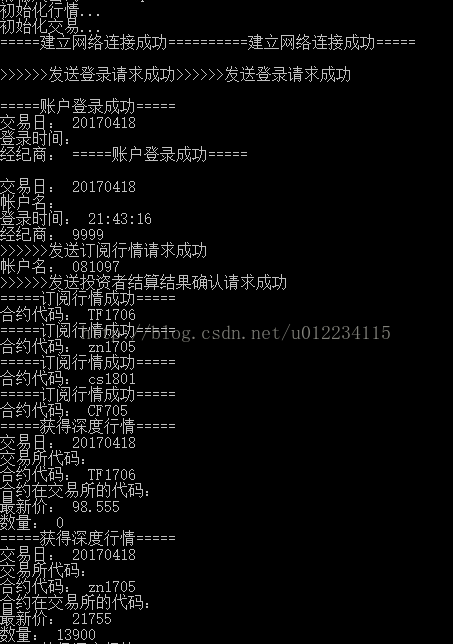
存成csv表格
交易
K线数据
报单情况
源码下载
github:demo
结语


u012234115
- 擅长领域:
- C++
- scala
- 游戏开发
- 量化开发
- 机器学习