
安装Webmin管理Linux系统 (正在使用)
Webmin是目前功能最强大的基于Web的Unix系统管理工具。管理员通过浏览器 访问Webmin的各种管理功能并完成相应的管理动作。目前Webmin支持绝大多数的Unix系统,这些系统除了各种版本的linux以为还包 括:AIX、HPUX、Solaris、Unixware、Irix和FreeBSD等。
Webmin 让您能够在远程使用支持 HTTPS (SSL 上的 HTTP)协议的 Web 浏览器通过 Web 界面管理您的主机。这在保证了安全性的前提下提供了简单深入的远程管理。这使得 Webmin 对系统管理员非常理想,因为所有主流平台都有满足甚至超出上述需求的 Web 浏览器。而且,Webmin 有其自己的“Web 服务器”,因此不需要运行第三方软件(比如 Web服务器)。万事具备。Webmin 的模块化架构允许您在需要时编写您自己的配置模块。除了在此介绍的模块之外,Webmin 还包括许多模块。尽管目前我们将主要关注网络服务,但是您会看到,几乎您系统的每一部分都能够通过 Webmin 来配置和管理。
安装Webmin
webmin的安装非常简单,因为其自身包含一个perl实现的web服务器,所以即便您的系统中没有apache,也可以运行!
webmin提供全自动的安装脚本:setup.sh。按着提示操作,几分钟就完成了!当然了,webmin是基于perl的,得确保系统中安装了perl(Centos 6中默认已经安装了Perl)!
Step 1
安装perl-Net-SSLeay模块,由于webmin功能太强大,几乎能管理linux系统的每个角落,所以在访问时最好使用https!避免一些敏感信息被窃取!
#可以先找到SSLeay包的完整名称
yum list | grep SSLeay

#开始安装SSLeay
yum install perl-Net-SSLeay.x86_64
Step 2很简单的安装过程,先去下载安装包把:http://www.webmin.cn/download.html
#假设下载的包在opt目录下
cd /opt

tar zxvf webmin-xxx.tar.gz

cd webmin-xxx

#确保setup.sh文件有执行权限
chmod 755 setup.sh

#开始安装
./setup.sh
安装截图:
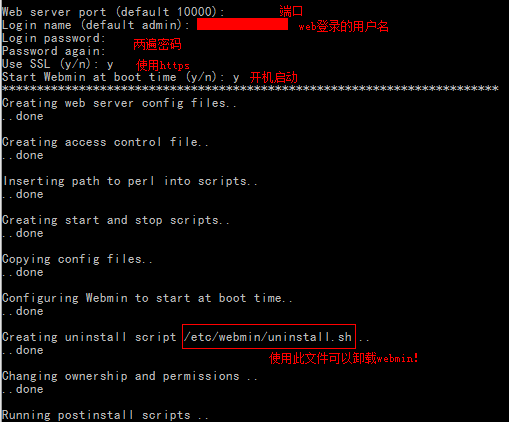
结束后,就可以使用https://ip地址;10000访问webmin了!
注意,iptables防火墙中要开启10000端口!
使用&配置Webmin
webmin在安装时默认的配置目录为/etc/webmin。
启动,关闭,重启webmin
启动:/etc/webmin/start
关闭:/etc/webmin/stop
重启:/etc/webmin/restart
miniServ配置(Webmin自带的web服务器)
相关配置文件:/etc/webmin/miniserv.conf
port=15002
addtype_cgi=internal/cgi
realm=Webmin Server
logfile=/var/webmin/miniserv.log
errorlog=/var/webmin/miniserv.error
pidfile=/var/webmin/miniserv.pid
logtime=168
ppath=
ssl=1
no_ssl2=1
no_ssl3=1
no_tls1=1
no_tls1_1=1
ssl_honorcipherorder=1
no_sslcompression=1
env_WEBMIN_CONFIG=/etc/webmin
env_WEBMIN_VAR=/var/webmin
atboot=1
logout=/etc/webmin/logout-flag
listen=15002
denyfile=\.pl$
log=1
blockhost_failures=5
blockhost_time=60
syslog=1
session=1
premodules=WebminCore
userfile=/etc/webmin/miniserv.users
keyfile=/etc/webmin/4_damogame.cn.pem
passwd_file=/etc/shadow
passwd_uindex=0
passwd_pindex=1
passwd_cindex=2
passwd_mindex=4
passwd_mode=0
preroot=authentic-theme
passdelay=1
login_script=/etc/webmin/login.pl
logout_script=/etc/webmin/logout.pl
cipher_list_def=1
failed_script=/etc/webmin/failed.pl
logouttimes=
trust_real_ip=0
libwrap=
alwaysresolve=0
preroot_root=blue-theme
inetd_ssl=1
ca=/etc/webmin/2_damogame.cn.crt
root=/usr/libexec/webmin
mimetypes=/usr/libexec/webmin/mime.types
server=MiniServ/1.890
访问webmin
打开您的浏览器,输入:https://ip地址:15002,开始体验强大的Webmin吧!
© 著作权归作者所有
4_damogame.cn.pem就是2_damogame.cn.crt和3_damogame.cn.key两个文件直接拼接而成的
systemctl status webmin